Choosing the best free construction takeoff software isn't just about finding a $0 price. Small contractors need to compare permanent free plans, short trials, measurement limits, exports and the cost of upgrading before trusting a tool with a real bid. Search results include permanent free plans, trials and demonstration-led products. Some general-purpose PDF utilities can measure a line but don't count fixtures or organize quantities into conditions, and some dedicated takeoff tools have free plans with limits you need to understand first.
This guide is for US contractors, subs and estimators who price work from PDF plans and want to know what a free takeoff tool can realistically do in 2026, where the limits apply, and when paying for software actually saves money. There's a short section for Australian builders near the end.
This article is published by SolidTakeoff, one of the products compared below.
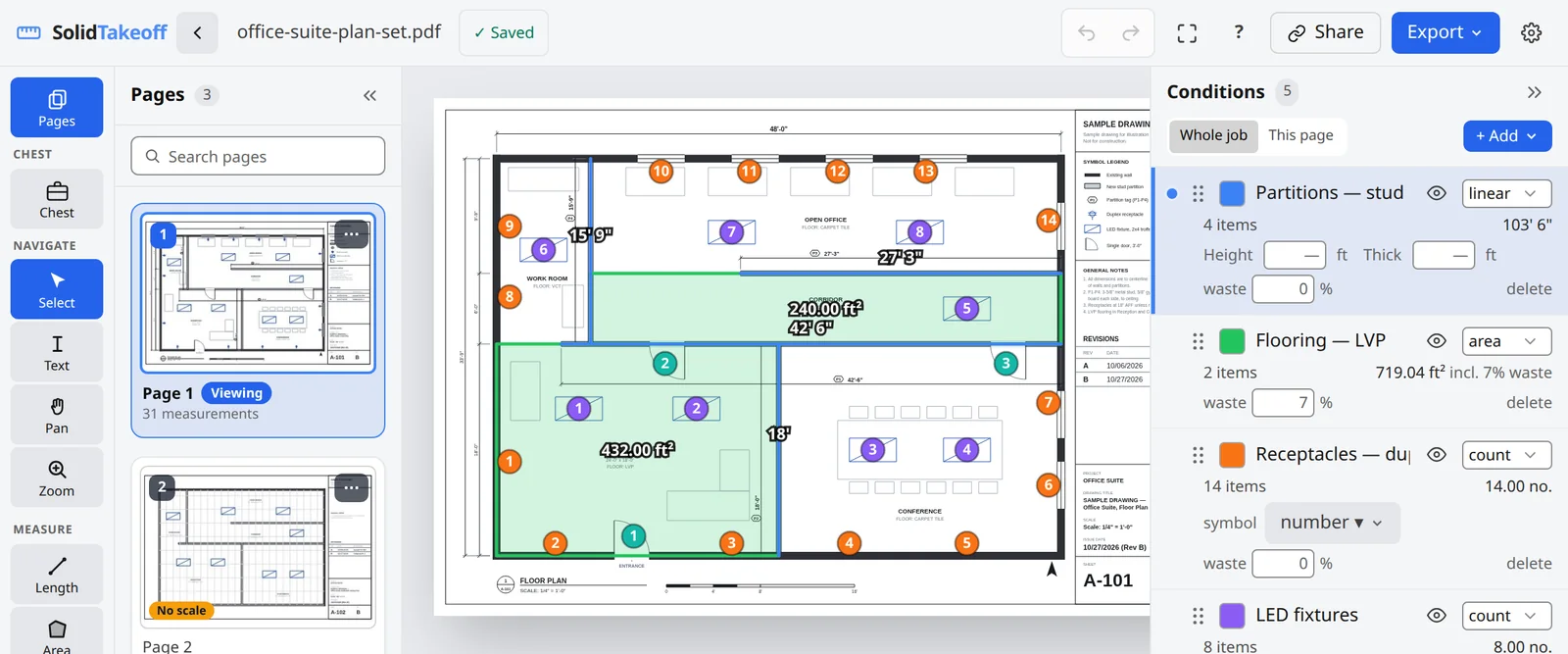
What "Free" Means in Takeoff Software
Before you compare features, sort every option into one of four buckets. It saves time later.
- Permanent free plan. You can keep using the product at $0, usually with caps on projects, uploads, storage, measurements or users.
- Free trial. Full or near-full features for a fixed period, then you pay to keep working. Good for evaluation, not for running your takeoffs long term.
- No permanent free plan identified. The vendor lists paid plans, a demo or a sales contact, but no $0 tier. Budget for it as paid software.
- General-purpose PDF utility with measuring tools. A PDF reader or editor that can measure distance or area. Useful for quick checks, but not built around conditions, counts and quantity export.
None of these is wrong. The mistake is treating a trial as a plan, or a PDF utility as takeoff software, and finding out mid-bid.
Free plan vs free trial vs paid upgrade
| Free plan | Free trial | Paid upgrade | |
|---|---|---|---|
| Cost | $0 for as long as you stay within the limits | $0 for a fixed period, often 7 or 14 days | Monthly or annual subscription, or a one-time licence |
| What you get | A capped version: limits on projects, uploads, measurements, storage or users | Most or all paid features while the trial runs | The full feature set of the tier you pay for |
| When you exceed a limit or the period ends | You keep working within the cap. Archive a project, wait for the next period or upgrade | You subscribe to keep working. Check what happens to your projects (some vendors keep them viewable, others lock them) | You move up a tier, add seats or add storage |
| Best for | Occasional bids and small single-trade packages | Evaluating a tool you expect to pay for | Regular bidding, larger sets and teams |
What Small Contractors Should Look For in Free Takeoff Software
Use these criteria to judge any free option, including ours.
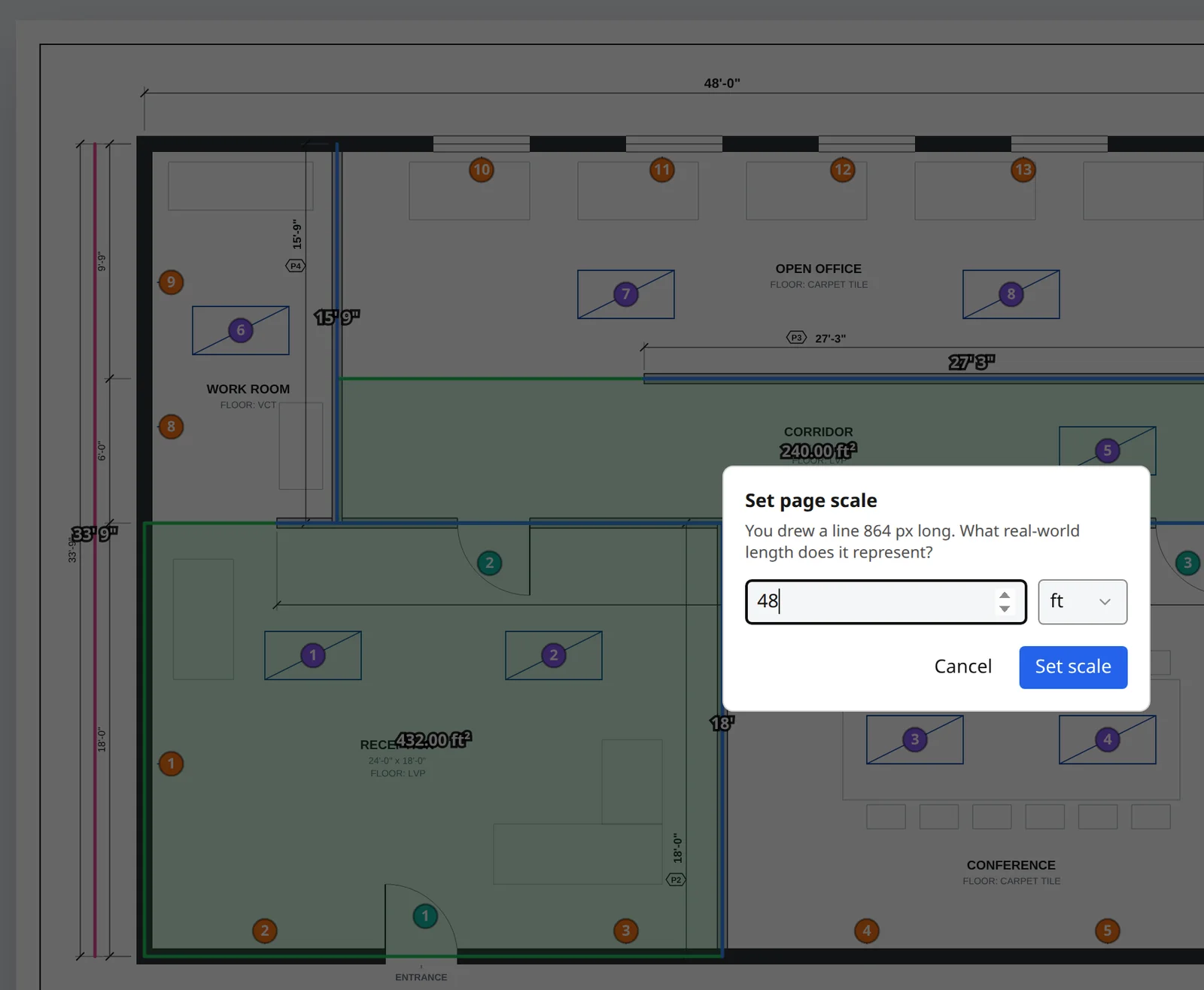
1. Real scale calibration on every sheet
Takeoff accuracy starts with scale. Look for scale presets like 1/4" = 1'-0", a draw-to-calibrate option for scanned or resized PDFs, and the ability to set a different scale per page. Treat any auto-detected scale as a suggestion: confirm it against a known dimension, then check it with a second measurement. For the full method, see how to scale a PDF drawing accurately.
2. All three measurement types: linear, area and count
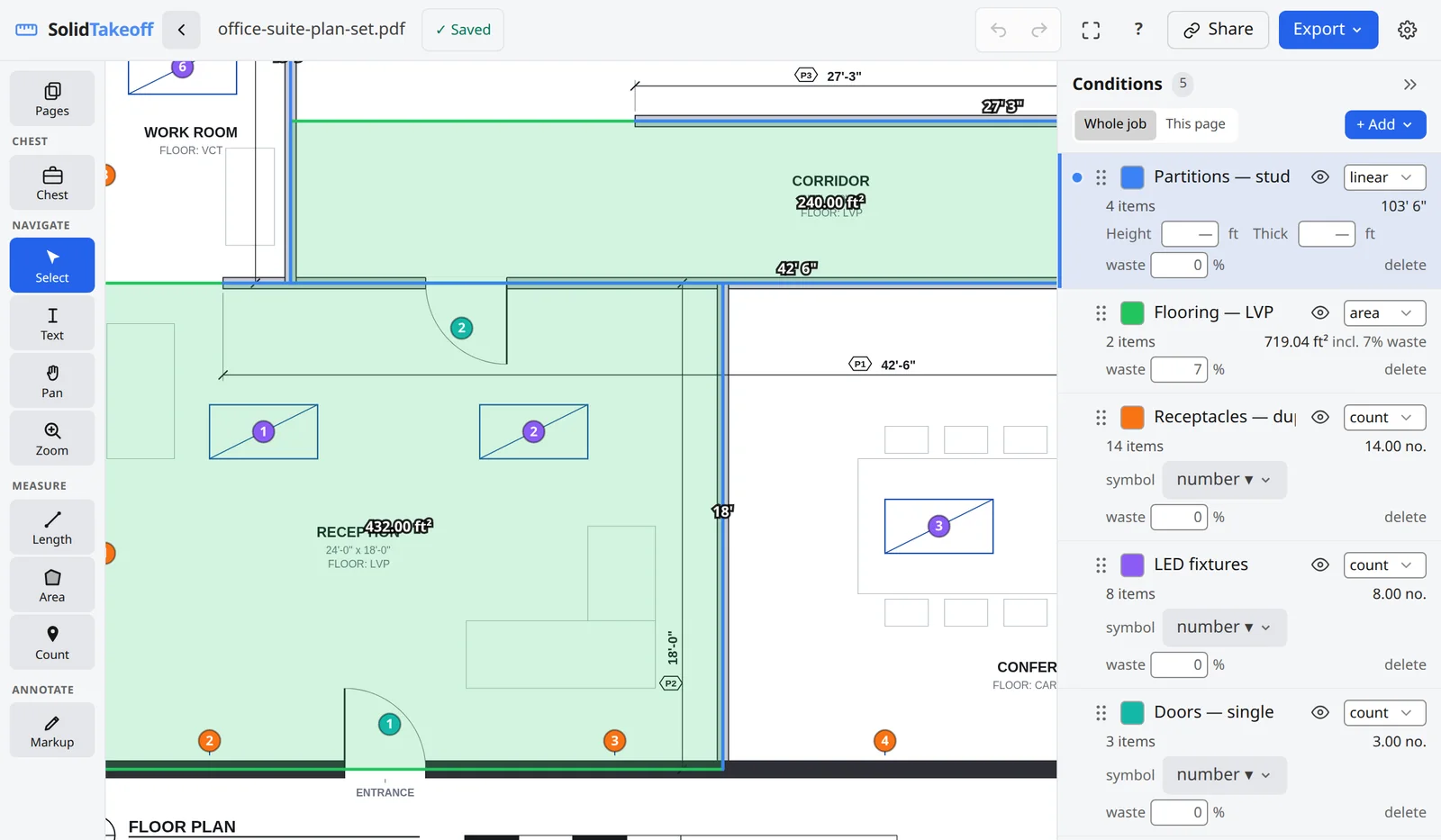
A free tool that measures length and area but not counts will leave you tallying doors, outlets and fixtures by hand. Check that the free tier includes linear feet, square feet and counts. Not just in a demo, but in the plan you will actually be on.
3. Conditions, waste and live totals
Raw measurements are not a takeoff. You need named conditions (for example DW-Type A, FL-LVP, E-Duplex), a waste percentage per condition, and totals that update as you draw. Without conditions, you're back to copying numbers into a spreadsheet and hoping nothing gets mixed up.
4. Usable exports
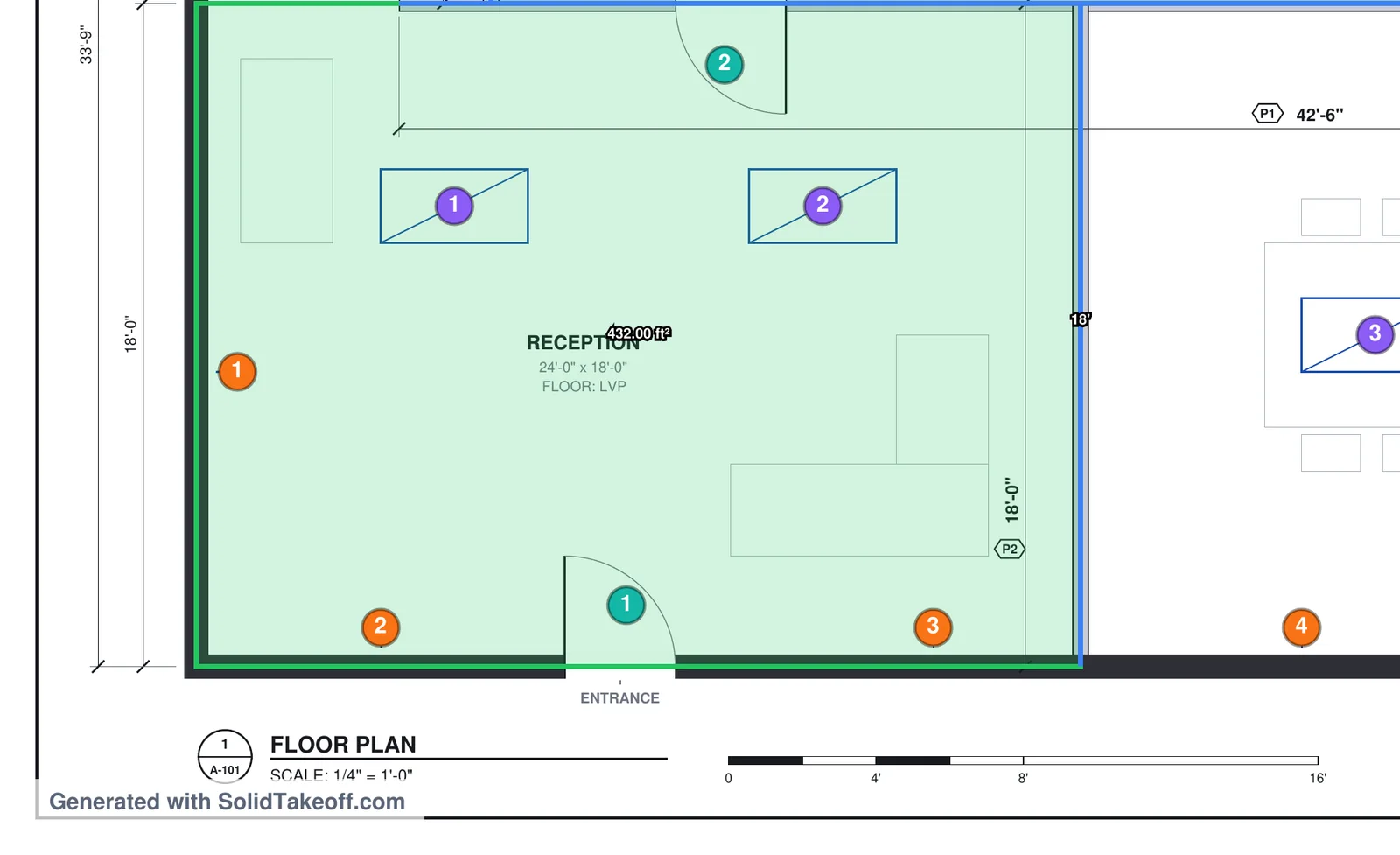
Ask what you can take out of the tool for free. A CSV of quantities and an annotated PDF are the minimum for sending numbers to a GC, checking with a supplier or pricing in Excel. Some free tiers watermark exports, and some restrict export entirely. Know which one you're getting. See how to export a takeoff to Excel.
5. Limits that match how you bid
Every free plan has a ceiling. The question is whether you'll hit it on the first job or after twenty. Common limits include:
- Active projects (per month or at one time)
- Plan pages or drawing uploads
- Measurements per project
- Storage
- Users and collaboration
A cap on measurements hurts dense interior work like drywall, ceilings and electrical. A cap on projects hurts contractors who bid many small jobs. Match the limit to your bid volume.
6. Works on the computer you already have
Many estimators now work on a Mac, a site laptop or a home machine. Browser-based tools avoid Windows-only installs and virtual machines. If you're on a Mac, see takeoff software for Mac.
7. A sensible upgrade path
Look at the first paid step, not just the free tier. Some free plans have substantially higher paid entry prices. A low-cost first paid tier lets you grow without a budget meeting.
Best Free Construction Takeoff Software Compared (2026)
How we compared: This comparison was prepared by SolidTakeoff, which is included in the table. Product descriptions and advertised prices were checked against vendor pricing and support pages on November 13, 2026. Prices are in US dollars unless noted. We have not independently tested every competing product; features and limits may change.
Each product name links to the vendor's own pricing or support page. Where a vendor didn't publish a figure, we left it out rather than guess.
| Tool | Free option (verified Nov 9, 2026) | First paid tier — price and billing term | Notes |
|---|---|---|---|
| SolidTakeoff | Permanent free plan, $0, no card: 1 active project, 3 new drawing uploads in total, 250 MB, 1 user, all measurement tools, PDF exports with a small footer | Solo: $12.99/month, billed monthly | Browser-based. New accounts get a 14-day trial of Team features, no card |
| STACK | Offers a free account; its pricing page doesn't list a free tier or its limits (see note below) | Premium: $299/user/month, billed annually | Pro: $349/user/month, billed annually, adds worksheet estimating and proposals. Cloud-based |
| Bluebeam Revu | 14-day free trial (Max plan), no card. No permanent free plan identified | Basics: $260/user/year, billed annually | Basics measures length and area only; counts and perimeter start at Core ($330/user/year) |
| PlanSwift | 14-day free trial, no card. No permanent free plan identified | Essential: $2,000/year, 1 seat | Core: $3,000/year, 1 seat. Annual plans |
| Togal.AI | No permanent free plan identified; sign-up leads to "Try Now" and a demo booking | Growth: $299/user/month, billed yearly | AI-automated takeoff. Business tier priced on request |
| Kreo | 7-day free trial. No permanent free plan identified | Essential: $100/user/month, billed annually | Essential is listed "without AI"; Pro ($175/user/month, billed annually) adds AI takeoff |
| zzTakeoff | 14-day free trial. No permanent free plan identified | Takeoff tier (Pro): $49.99/user/month, or $549.89/user/year | Collaborator ($19.99/user/month) is an annotation-only tier with no takeoff tools |
| Square Takeoff | 14-day free trial. No permanent free plan identified | $249/month, month-to-month | Also $599/quarter or $1,699/year; unlimited jobs |
| Easy Takeoffs | 14-day free trial, no card. No permanent free plan identified | $39/user/month, billed monthly, or $399/user/year | All features and unlimited projects; single-user accounts (team plans listed as coming soon) |
| PDF-XChange Editor | General-purpose PDF utility (Windows 10 and later). Free version for private and commercial use; licensed features can be used but add watermarks to output | Editor licence: one-time fee, 1 user (perpetual, 1 year of maintenance included); the vendor shows the price in your local currency | Includes distance, perimeter and area measuring with scale calibration. Check which features you need are watermark-free before relying on the free version |
| Adobe Acrobat Reader | General-purpose PDF utility, free reader | Not compared (paid Acrobat plans not checked) | Distance, perimeter and area tools work in Reader only if the PDF creator enabled measuring |
Note on STACK: STACK's site invites you to create a free account, but its pricing page doesn't list a free tier or its limits, and its publicly accessible documentation describes the free offering in differing ways. Check current account entitlements before relying on it for a live project. The Premium and Pro prices above are the figures displayed on STACK's takeoff and estimate pricing page on November 13, 2026.
Permanent free options exist, but their capabilities and limits vary. Among the dedicated takeoff products here, SolidTakeoff and STACK both offer free access, and they restrict different things. SolidTakeoff's Free plan limits active projects, uploads and storage while keeping every measurement tool available. STACK's free account has its own limits, which aren't published on its pricing page, so check them against your bid volume. Most of the takeoff products compared in this table offer trials rather than permanent free tiers. A 14-day trial is a good way to evaluate a tool like Bluebeam or PlanSwift before you buy, but it isn't a way to run your takeoffs for free.
Measure Square also offers a fully functional free trial with no credit card, according to its pricing page. We didn't include it in the table because the trial length and plan prices weren't listed in a form we could confirm.
For head-to-head detail, see our comparisons with Bluebeam, PlanSwift, Togal, Kreo and Square Takeoff. Like this article, those comparison pages are written by SolidTakeoff.
Which Free Takeoff Software Is Best for Your Work?
There's no single best free tool for every contractor. The right choice depends on how often you bid, how big your drawing sets are and what you do with the quantities afterwards. This article is published by SolidTakeoff, one of the products compared, so use the breakdown below as a starting point and check each vendor's current page before deciding.
| Contractor need | What to compare | Examples from this comparison (verified Nov 9, 2026) |
|---|---|---|
| Occasional PDF measurements and quantity exports | Genuinely free plans and their limits | SolidTakeoff Free (1 active project, 3 new drawing uploads in total, PDF exports with a footer, plus CSV); STACK's free account (check current entitlements); PDF-XChange Editor or Acrobat Reader for quick measurement checks |
| Higher drawing volumes | First paid tiers and upload caps | SolidTakeoff Solo ($12.99/month, unlimited projects and uploads); Easy Takeoffs ($39/user/month, unlimited projects); Square Takeoff ($249/month, unlimited jobs); STACK Premium ($299/user/month billed annually, unlimited projects and plan pages) |
| Integrated estimating and proposals | Broader platforms, even at higher cost | STACK Pro ($349/user/month billed annually) adds worksheet estimating and proposal generation |
| Mac-based contractors | Browser or macOS-compatible workflows | Browser-based or cloud tools such as SolidTakeoff, STACK and Easy Takeoffs. Bluebeam lists Revu for Windows desktop plus web and mobile; PDF-XChange Editor requires Windows 10 or later |
| Australian metric tendering | Metric calibration, export units and BOQ workflow | SolidTakeoff (metric scales, m and m² totals, CSV export); STACK lists metric and imperial units on its pricing page |
Can You Bid Real Work With Free Takeoff Software?
Yes, if the free tier gives you scale calibration, linear, area and count tools, conditions and an export you can use. A small tenant improvement, a residential remodel or a single-trade package for one GC is well within reach of a good free plan.
Where free plans struggle:
- Volume. If you bid several jobs a week, a one-project limit means archiving and restarting constantly.
- Large sets. Upload, page or storage caps show up fast on multi-sheet commercial sets.
- Presentation. Footers or watermarks on exports are fine for internal pricing but may not be what you want to send a GC.
- Teams. Free plans are often limited to one user. Two estimators splitting a set need shared projects.
- History. When a revision lands, being able to restore an earlier version of a drawing's takeoff saves rework.
Whatever tool you use, run the construction takeoff checklist before you submit. A free tool doesn't excuse a wrong revision or an unverified scale.
When It's Worth Upgrading From a Free Plan
Do the math in hours, not dollars. If a paid tier saves you one hour of re-measuring or spreadsheet cleanup a month, it has usually paid for itself at small-contractor rates. Upgrade when:
- You're archiving projects just to start the next one
- You've run out of uploads or storage
- You need clean exports to send to GCs or owners
- A second person needs to work on the same takeoff
- You want a version history to protect against mistakes and revisions
On the other hand, if what you need is accurate quantities off a PDF, you may not need a broader enterprise-oriented platform. Integrated estimating, proposals and AI auto-takeoff are worth paying for when you'll use them every week, and expensive shelfware when you won't.
How SolidTakeoff's Free Plan Works
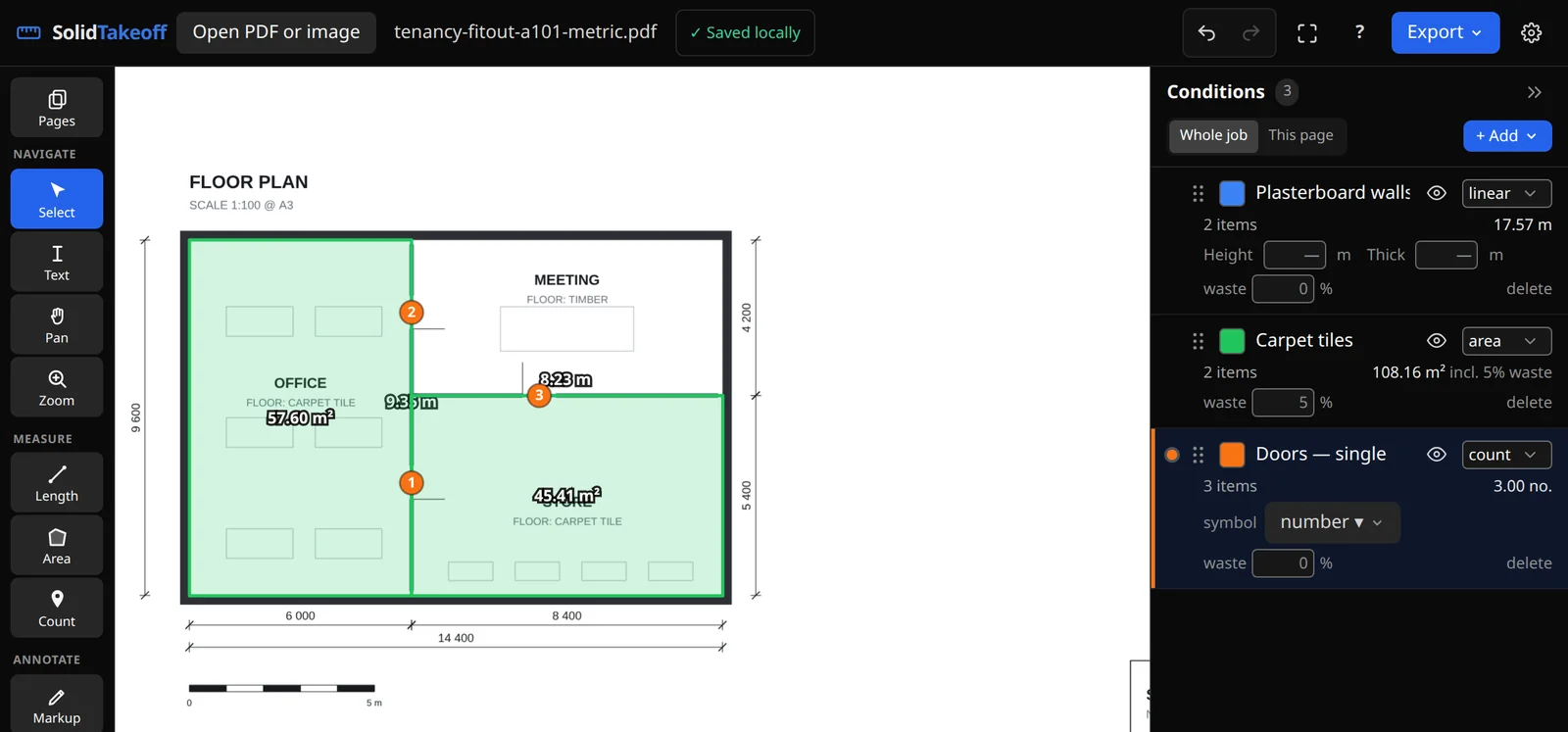
We built SolidTakeoff for contractors who need a takeoff tool, not a preconstruction platform. Everything runs in the browser on Mac, Windows, Linux or ChromeOS. You can open the editor and measure a PDF without creating an account; that work is saved in your browser only. Create a free account when you want projects saved to the cloud. To try free construction takeoff software with no signup, open a plan on our free tool page.
On the Free plan you get:
- Every measurement and takeoff tool: linear, area and count
- Scale presets, draw-to-calibrate and AI auto-scale (confirm it against a known dimension)
- Conditions with waste %, live totals and a full conditions library
- Wall area and volume derived from a linear run (add a height for wall area, and a thickness as well for volume). This isn't a general 3D volume takeoff tool
- Markup tools (notes, text boxes, callouts, arrows, lines, pen and shading), trade symbols and a drawing legend. Signing drawings is on Solo and Team
- Vector PDF export with a small "Generated with SolidTakeoff.com" footer, plus CSV export
- 1 active project, 3 new drawing uploads in total, 250 MB storage, 1 user
When the free limits get in the way:
| Plan | Price and billing term | What changes |
|---|---|---|
| Free | $0 | 1 active project, 3 new drawing uploads in total, 250 MB, 1 user, PDF exports with a small footer |
| Solo | $12.99/month, billed monthly | Unlimited projects and uploads, 10 GB, exports without the Free-plan footer, full version history, 1 user |
| Team | $49.99/month for 3 users, then $16.99/month per extra user | 50 GB shared storage; live multi-user collaboration; shared libraries and role permissions |
New accounts get a 14-day free trial of Team features. No credit card required. When the trial ends, you keep the Free plan and nothing you measured is deleted. Full details are on the pricing page.
Measure your next set of plans for free. Upload a PDF, verify the scale, measure quantities and export your takeoff. No credit card required. Start free →
Free Takeoff Software in Australia: What Changes
For Australian builders and trades, the same seven criteria apply, with a few local checks:
- Metric scales. Make sure the tool calibrates to ratios like 1:100 and 1:50 and reports lengths in metres (m) and areas in square metres (m²). Check that each sheet in an A1 or A3 set can carry its own scale.
- Tender and BOQ output. Commercial tenders often want a bill of quantities. A CSV export lets you move measured quantities into the BOQ format the tender requires in Excel or your estimating system.
- Local terminology. Plasterboard rather than drywall, skirting rather than base, tenders rather than bids. The measuring is the same, but your condition names should match how you price.
- Currency. Many takeoff tools, including SolidTakeoff, list prices in US dollars. Factor the exchange rate into any comparison.
SolidTakeoff's Free plan works the same way in Australia: metric calibration, m and m² totals, and CSV export for your BOQ. Australian estimators comparing local platforms can also see our notes on Buildxact and CostX.
Free Construction Takeoff Software FAQ
Is there any truly free construction takeoff software?
Yes. Permanent free options exist, but their capabilities and limits vary. Most of the takeoff products compared in this article offer trials rather than permanent free tiers. As of November 13, 2026, SolidTakeoff lists a permanent $0 Free plan, and STACK offers a free account whose limits aren't listed on its pricing page. General-purpose PDF utilities such as PDF-XChange Editor and Acrobat Reader can also measure, but they aren't full takeoff tools.
What is the difference between a free plan and a free trial?
A free plan stays free indefinitely within its limits. A free trial gives you full features for a set period, then requires a paid subscription to keep working. Check what happens to your projects when a trial ends.
Can I do a takeoff in Adobe Acrobat Reader for free?
You can measure distance, perimeter and area in Reader only if the PDF creator enabled measuring, according to Adobe's documentation. Reader is a general-purpose PDF utility, not a takeoff tool built around conditions, counts or waste, so it suits quick checks better than full bids.
What should a free takeoff tool include at minimum?
Scale calibration per sheet, linear, area and count measurement, named conditions with waste %, and an export you can use (CSV and/or annotated PDF). Without those, you'll spend the time you saved re-entering numbers.
Is free takeoff software accurate enough for bids?
Accuracy depends on scale calibration and your process more than on price. Calibrate against a known dimension, verify with a second measurement, and run a pre-bid checklist. The software only multiplies what you measure.
Does free takeoff software work on a Mac?
Browser-based tools work on a Mac without extra setup. Bluebeam's pricing page lists Revu for Windows desktop plus Bluebeam on web and mobile, and PDF-XChange Editor lists Windows 10 or later, so check which features you need before choosing a desktop tool on a Mac.
Related Guides
New to digital takeoff? Start with how to do a construction takeoff from PDF plans, then use the construction takeoff checklist before you bid. Working from scans? See how to set scale on a scanned plan. Need a quick measurement with no account? Try measure a PDF online.
Measure your next set of plans for free. Upload a PDF, verify the scale, measure quantities and export your takeoff with SolidTakeoff. No credit card required. Start at solidtakeoff.com/signup.