Measure a PDF drawing, properly
Solid Takeoff does one job properly: turning a PDF plan — or a photo or scan — into accurate, organised quantities you can hand to an estimate. Set the scale, trace what you need, and read lengths, areas, volumes and counts straight off the drawing — in the browser, nothing to install.
Let AI find the scale — or set it yourself
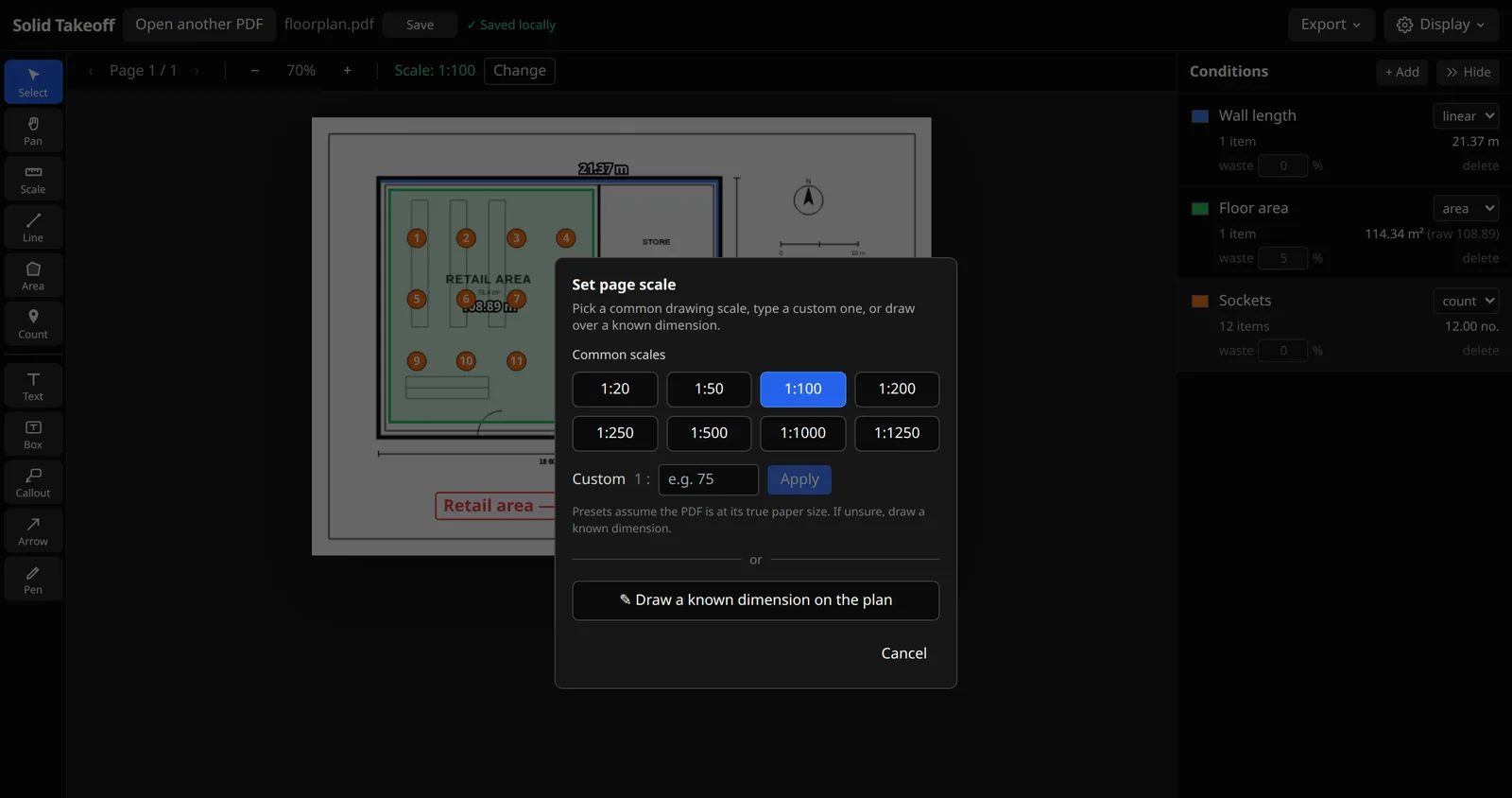
Every measurement is only as good as the scale behind it. Press ✨ Detect and Solid Takeoff reads the sheet for you — preferring a graphic scale bar or a labelled dimension, because those stay true even when a PDF has been resized or scanned, and falling back to the title-block ratio. Or set it yourself: pick a standard drawing ratio, or trace a dimension you know and type the real length. Nothing is applied until you confirm, the active scale is always shown, and you can change it any time.
- AI scale detection: reads the scale bar, a labelled dimension or the title-block ratio
- Tells you which method it used and how confident it is — you confirm before it applies
- Common ratio presets: 1:20, 1:50, 1:100, 1:200, 1:250, 1:500…
- Or draw over a known dimension to set a custom scale
- Open PDFs or images (photos/scans) — calibrate images by dimension
- Per-page scales for plan sets that mix sheet scales
Measure lengths, areas, volumes and counts
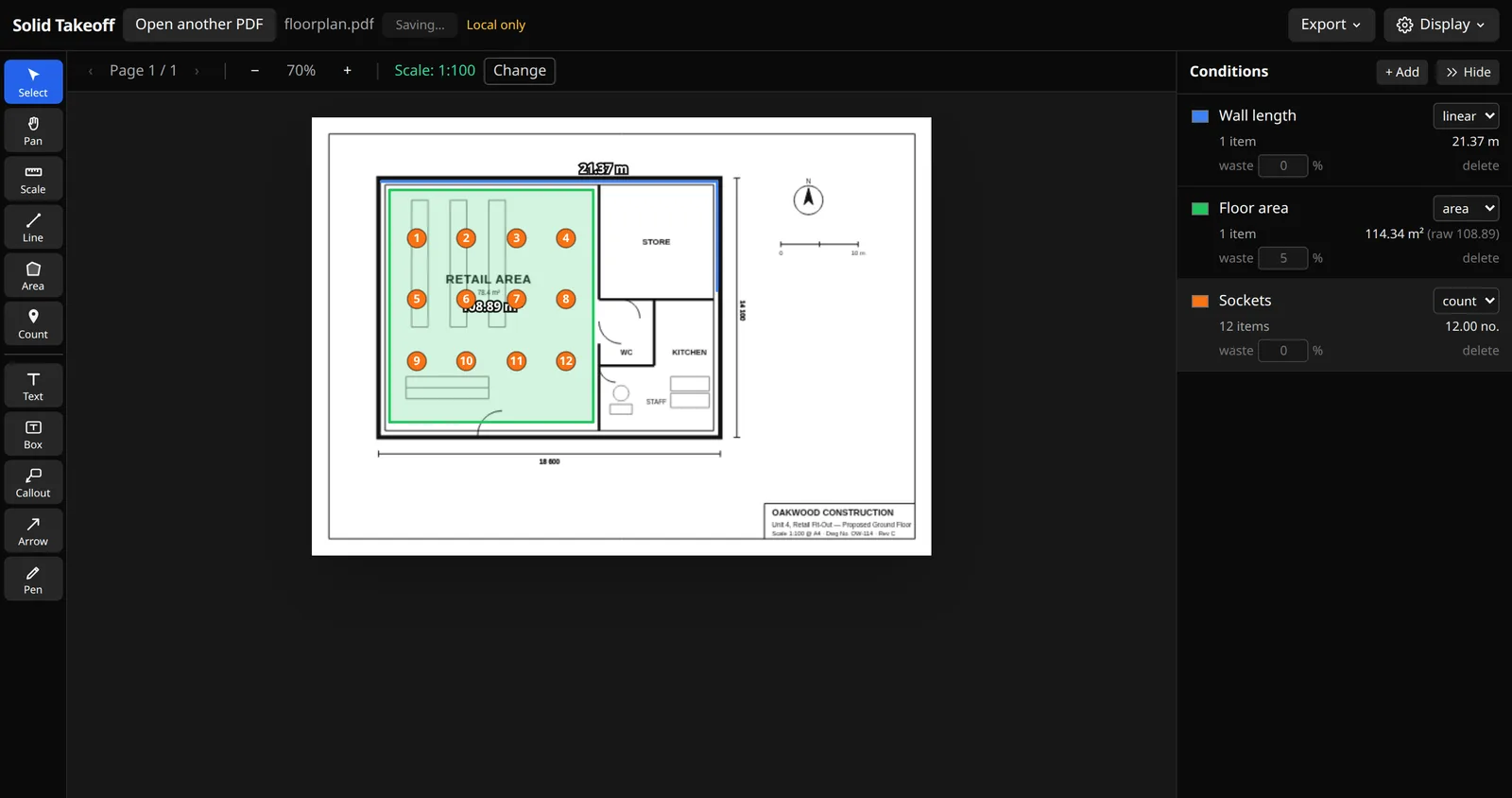
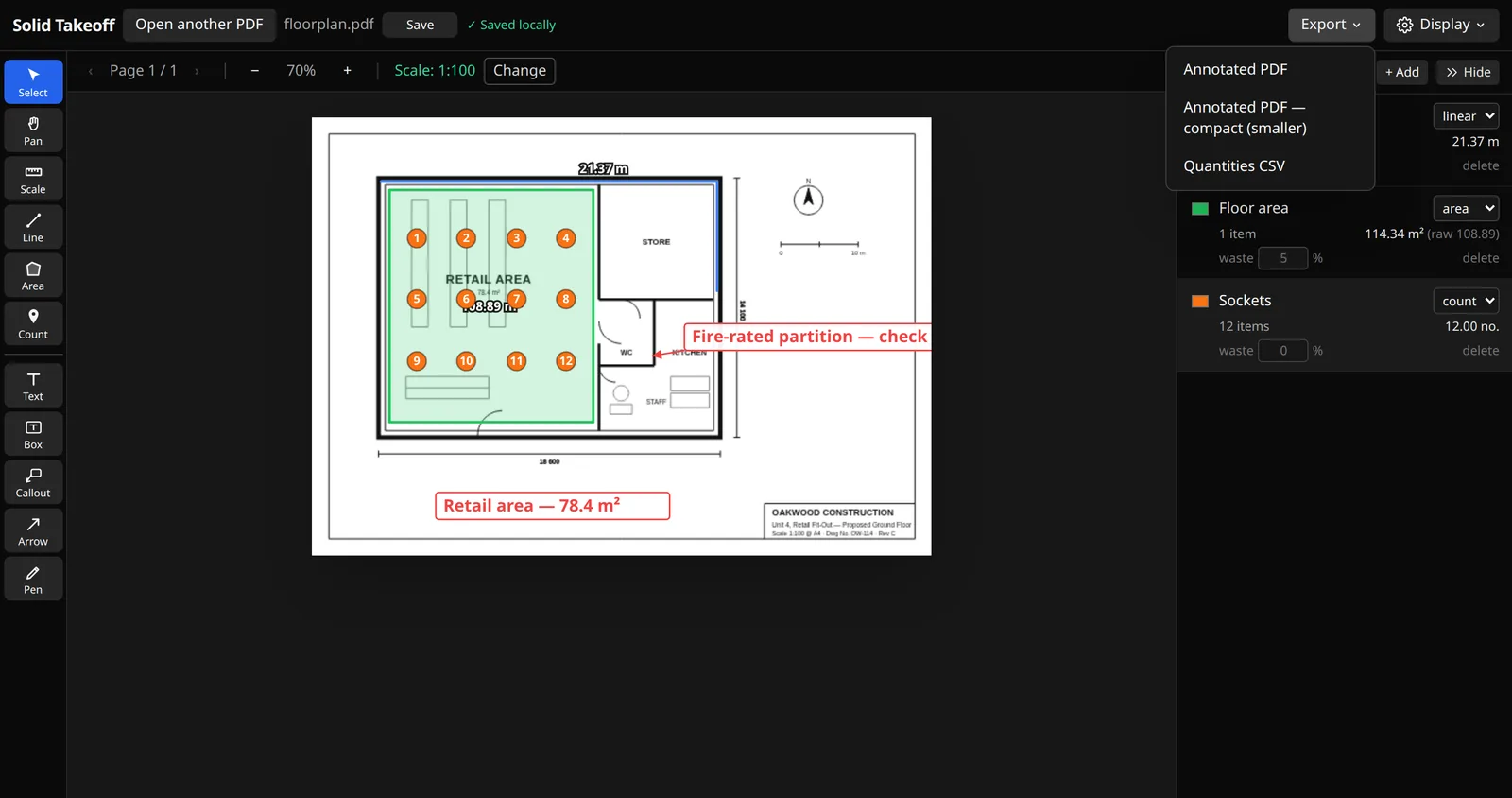
Trace a wall for linear metres, close off a room for square metres (and its perimeter), or drop numbered pins to count sockets, doors and fittings. Values update live as you draw, in the unit you choose, so you can sanity-check as you go. One traced wall run can give lineal, surface area and volume at once — set a height and a thickness and all three are reported.
- Linear runs with running length as you click
- Areas with automatic area and perimeter
- Numbered count markers for fittings and fixtures
- Or stamp a real symbol — socket, downlight, smoke detector — instead of a number
- Give a linear run a height for wall area (m²), add a thickness for volume (m³)
- Adjustable decimal places on every label and export
Conditions, waste % and instant totals
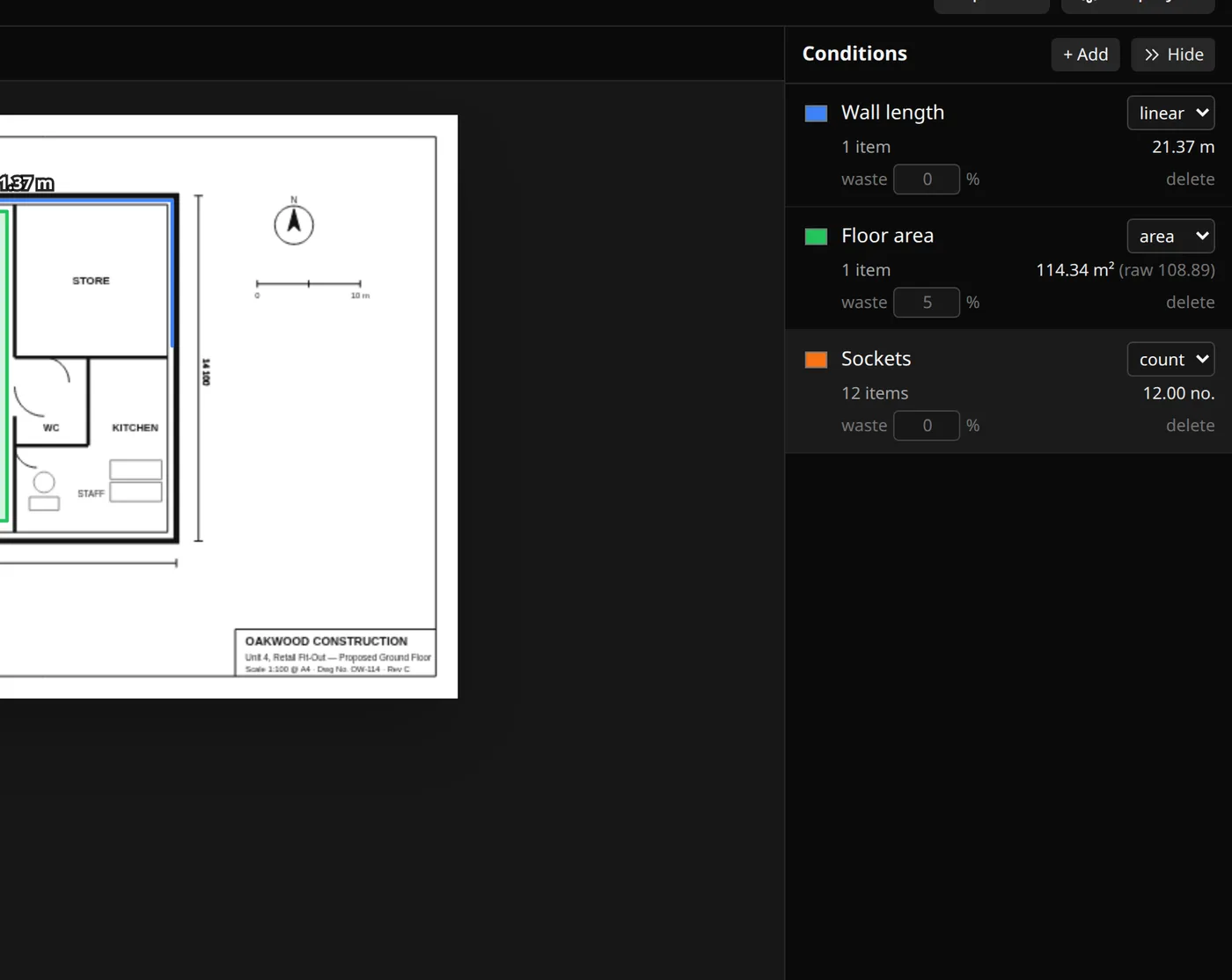
A takeoff isn't a pile of numbers — it's organised quantities. Every measurement lands in a condition (“Floor area”, “Skirting”, “Sockets”) with its own colour and waste allowance, and the totals stay correct as you work.
- Group measurements into named conditions
- Set a waste % per condition — totals adjust automatically
- Colour-coded so the plan stays readable
- Switch any total between the whole job and the sheet you're on
- Everything rolls up into the export summary
Bluebeam-style markup, without the Bluebeam price
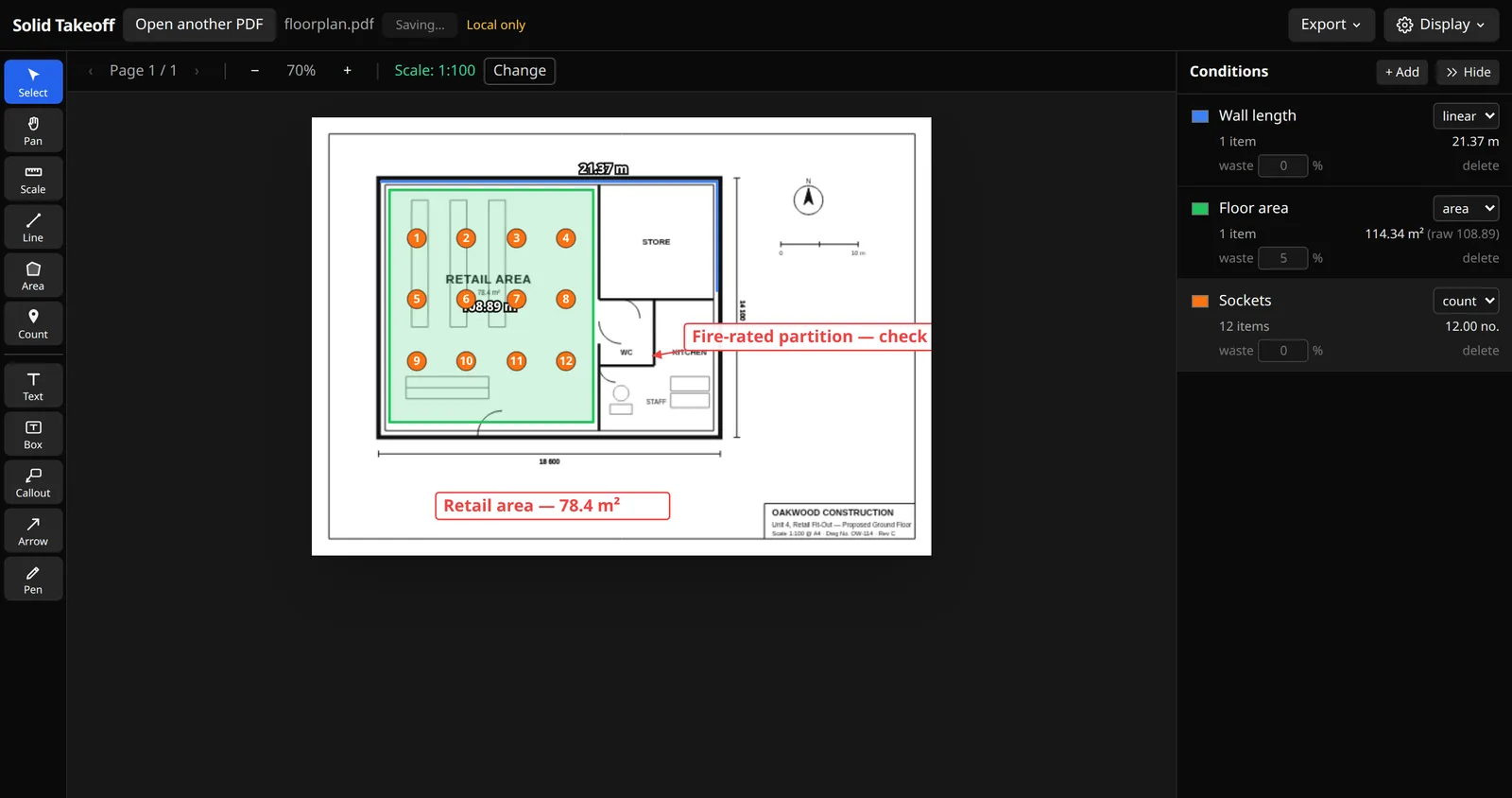
Communicate on the drawing itself. Add notes, arrows, boxes and callouts in any colour and size, drag them into place, and select several at once to move or clear them. It feels like the markup tools you already know. Counts can be stamped as proper trade symbols — sockets, data points, downlights, call points, sanitaryware — drawn to the British and international standards your client already reads, in four sizes, and you can upload your own.
- Text notes, arrows and freehand pen
- Text boxes and leader callouts for RFIs and notes
- Size and colour controls; drag to reposition
- Marquee multi-select — move or delete a group at once
- 45 standard symbols to BS 7671 / IEC 60617 and BS 5839 / ISO 7010
- Upload your own PNG or SVG symbols — shared across the workspace
- A tool chest of saved conditions and markup presets, one click to reuse
Clean PDF and CSV your estimate can use
When you're done, export an annotated PDF with a tidy quantity summary, or a CSV that drops straight into your estimate. A compact export keeps file sizes small for emailing. Solo and Team exports come out watermark-free.
- Annotated PDF with every measurement drawn on
- Automatic quantity summary page (items, waste, totals)
- An optional legend printed on the drawing, per sheet, with its own heading
- CSV for your spreadsheet or estimating software
- Compact mode to shrink large plan sets
Cloud projects, auto-save and your team
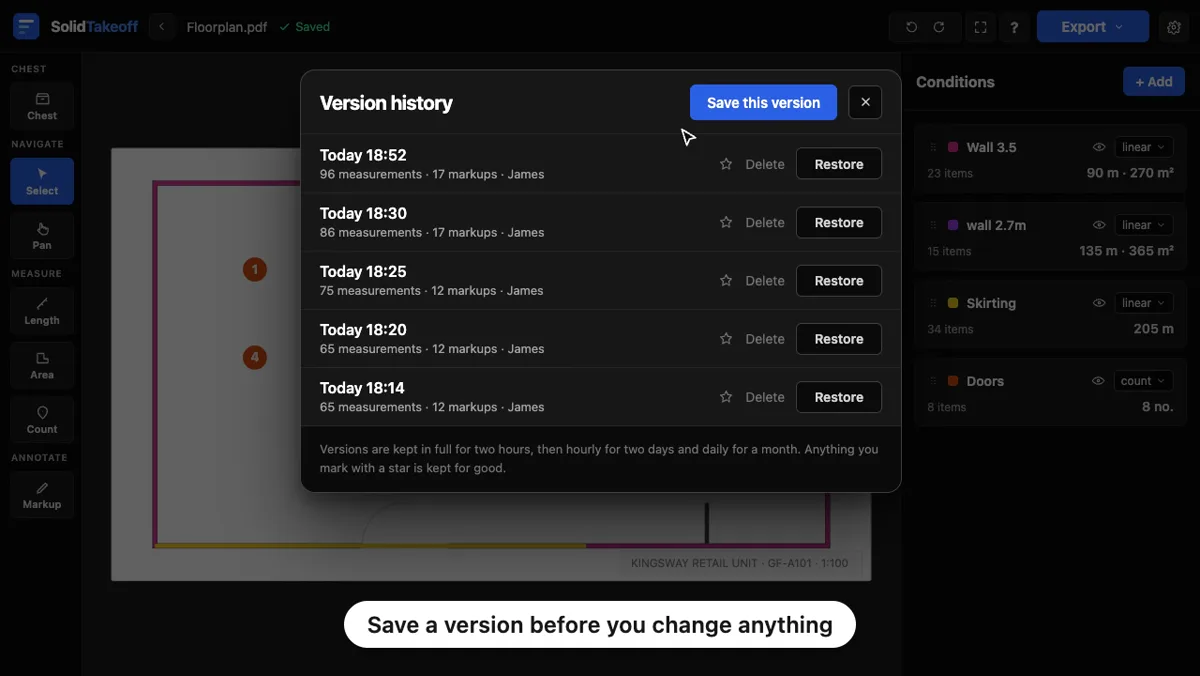
Keep plans organised in projects and workspaces, with auto-save so nothing is lost. A takeoff is hours of work, so every drawing also keeps a timeline of itself: open the history, see when each version was saved and how much was on the drawing, and put any of them back in one click — see version history in action. Want to try before signing up? Open a PDF and measure straight away — it's backed up to your browser until you create an account.
- Workspaces, projects and plans that stay put
- Auto-save while you work — pick up where you left off
- Version history: go back to any point, not just one step of undo (Solo and Team)
- Mark the version you issued to the client — it's kept for good
- Duplicate a sheet with its takeoff, add a blank page, or append another PDF
- Try instantly without an account (saved to your browser)
- Invite your team on Team
Take off the same plan together, live
Open a plan with a teammate and work it at the same time. Measurements, conditions and markup appear for everyone the moment they're made, so two estimators can split a drawing and never step on each other's work.
- Everyone's measurements, conditions and markup sync in real time
- See who else is on the drawing (coloured initials)
- No refreshing, no emailing files, no overwriting each other
- View-only share links — no login needed to look at your takeoff
- Let the recipient take their own copy of the drawing, if you want them to
- Invite your team on Team
And the details that add up
PDFs & images
Open a PDF plan set or a photo/scan of a drawing. Have AI detect the scale, use a ratio preset, or draw a known dimension.
Linear, area & count
Trace lengths, close off areas (with perimeter), and drop numbered count markers. Live values as you draw.
Conditions & waste
Group measurements into named conditions with a waste %. Totals update instantly and roll into your export.
Version history
Every drawing keeps a timeline of itself — restore any point in one click, and mark the version you issued so you can always show what you sent. Solo and Team.
Bluebeam-style markup
Text, arrows, freehand, text boxes and leader callouts — size and colour controls, drag to move, multi-select.
Clean PDF & CSV export
Export an annotated PDF with a quantity summary, or a CSV for your estimate. A compact mode shrinks big files.
Cloud projects
Organise plans into projects and workspaces with auto-save, so your takeoff is there when you come back.
Real-time collaboration
Measure the same plan with your team — marks and conditions sync live, with presence showing who's on the drawing.
Standard trade symbols
45 symbols across power, data, lighting, fire, security, HVAC and plumbing — drawn to BS 7671 / IEC 60617 and BS 5839 / ISO 7010. Stamp them on counts, or upload your own.
Legend on the drawing
A key in the corner of each sheet listing every symbol used, what it means and its total for that page — with a heading you choose. Prints on shared links and exports.
Tool chest
Save the conditions and markup presets you use on every job into named sets, shared with your team. One click drops them into a new drawing, set up and ready.
Page tools
Duplicate a sheet with its takeoff intact, add a blank page to sketch on, append another PDF or a site photo, and delete removed sheets for good.
Share links
Send a view-only link — no login needed. Quantities show by default and can be toggled per condition, and you can let the recipient take their own copy of the drawing.
See it on your own plan
Open a PDF in the live editor — no sign-in needed — and measure it in under a minute.